UX Journey

Nicholas Pagonis

  • By Nicholas Pagonis

    After several weeks of researching, planning, designing, and revising, my UX Launch Kit has reached its final stage of development. One of my biggest goals going into this final week was to stop thinking about the different resources as separate pieces and figure out how they could work together as one product.

    That led me to Notion.

    Earlier in the development process, I created individual resources for project planning, case study development, portfolio preparation, and other parts of the UX process. While each resource could be useful on its own, I realized that the experience still needed something connecting everything together. I didn’t want the UX Launch Kit to feel like a folder of templates that users had to figure out for themselves.

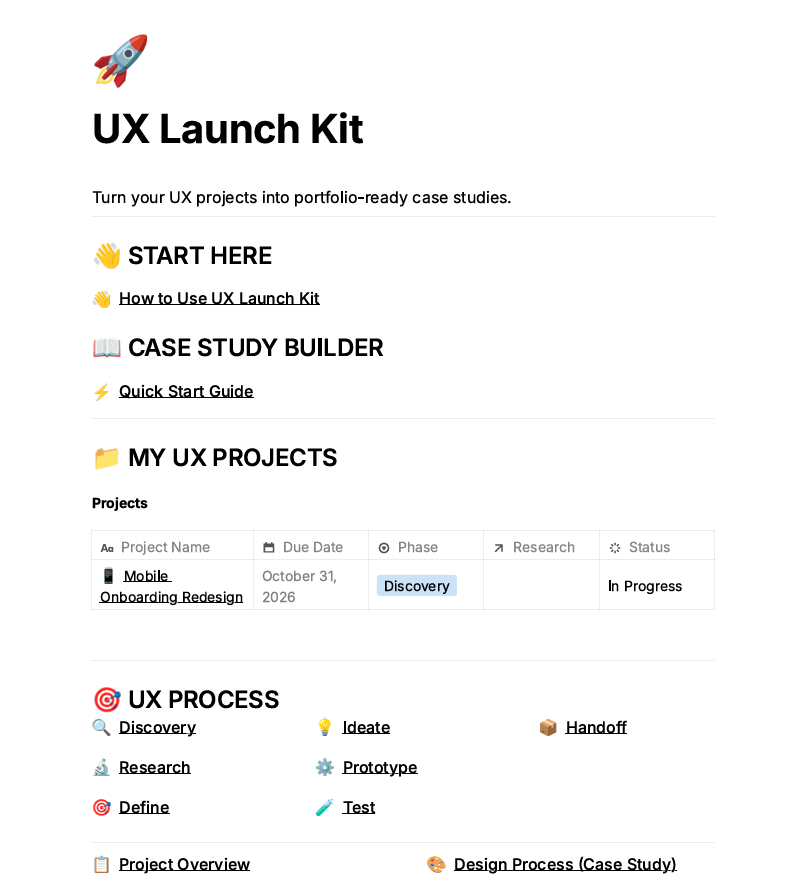
    For the final version, I created a central dashboard in Notion where the different parts of the UX Launch Kit can live in one place. The dashboard gives users access to their UX projects, the UX design process, a Case Study Builder, portfolio preparation checklists, research tools, and additional resources.
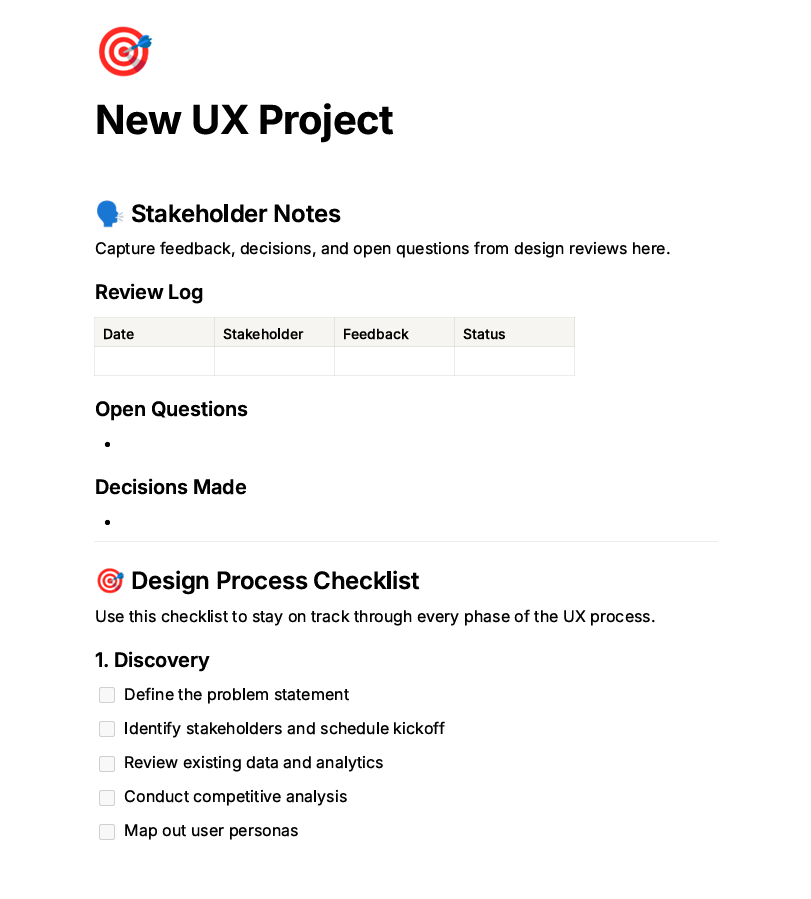
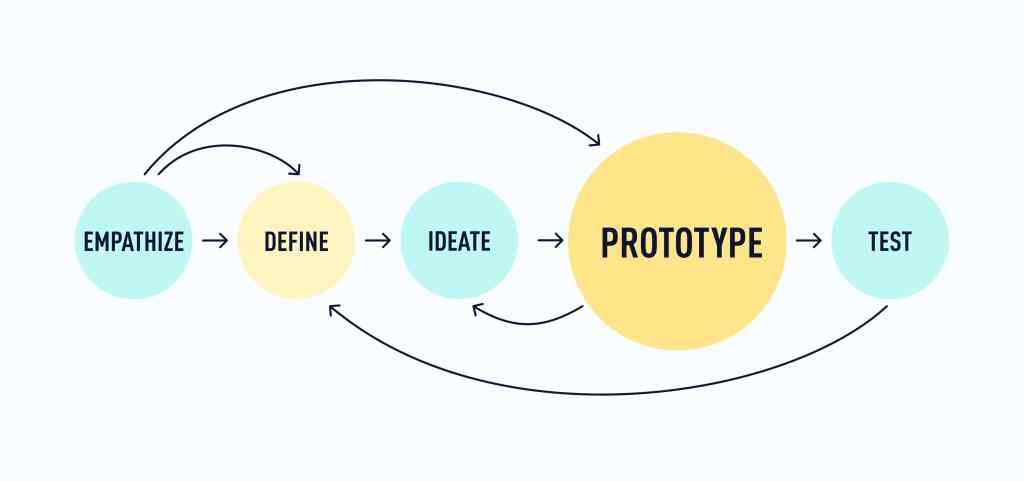
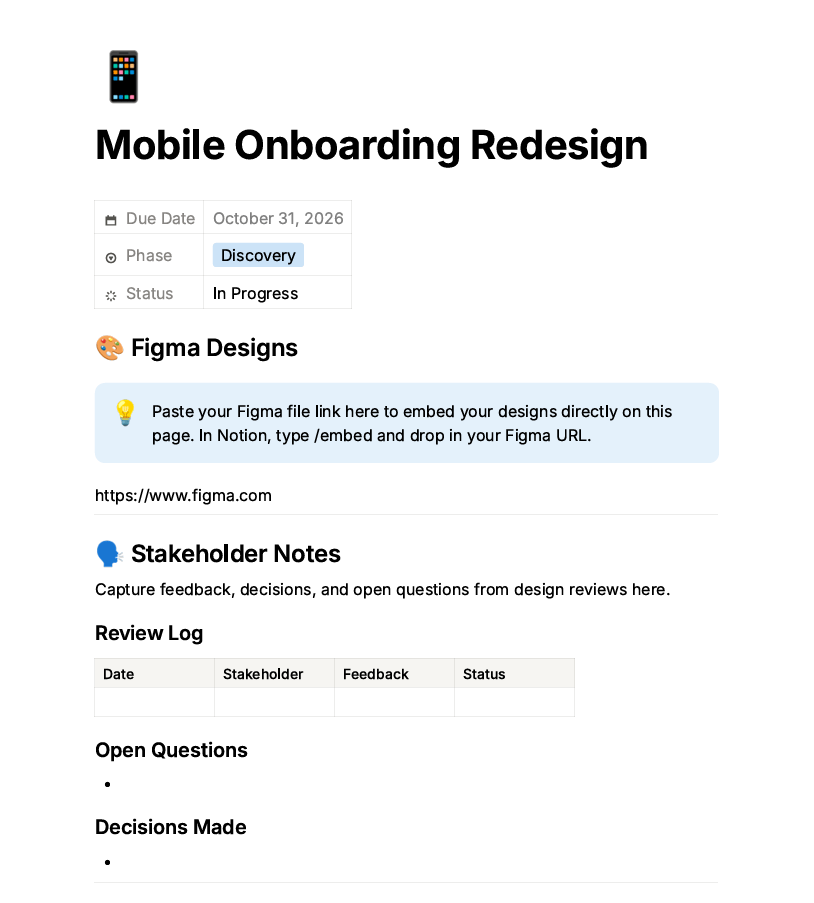
    I also created a reusable project structure that walks users through the UX process from discovery and research through prototyping, testing, and handoff. Within an individual project, users can keep track of stakeholder feedback, decisions, questions, project status, and their design work. This makes the toolkit useful while someone is completing a UX project, not just after the project is finished.

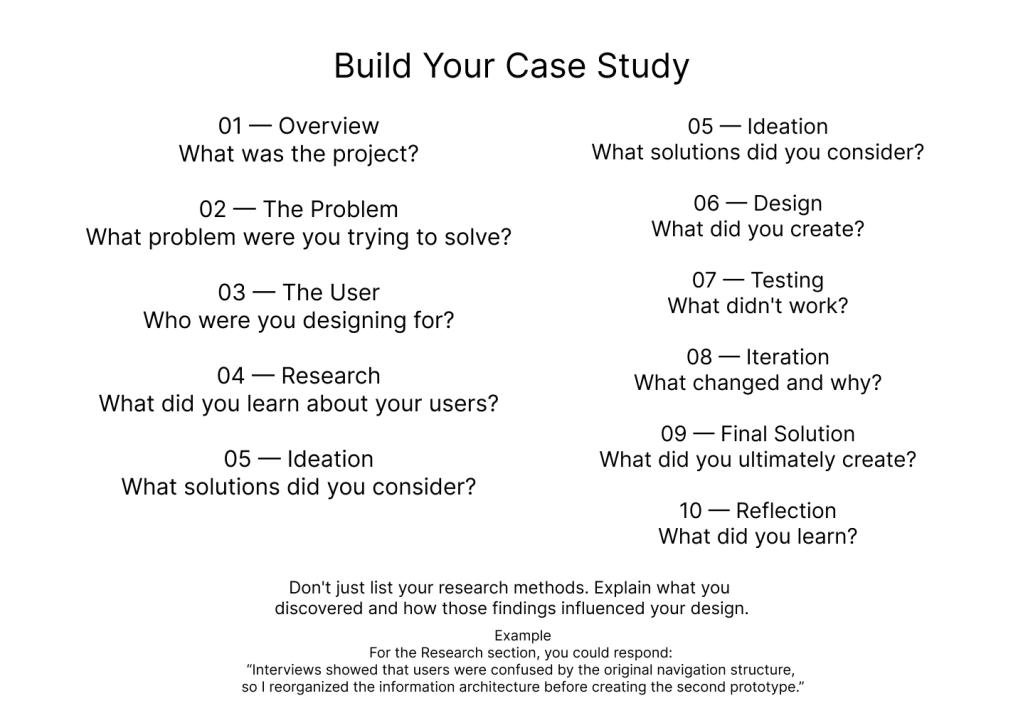
    One of the most important additions was connecting that work to the Case Study Builder. After documenting a project, users can organize the story behind their work by thinking through the problem, users, research, design process, testing and iteration, final solution, and reflection. The goal is to make the transition from completing a UX project to presenting it in a portfolio less overwhelming.

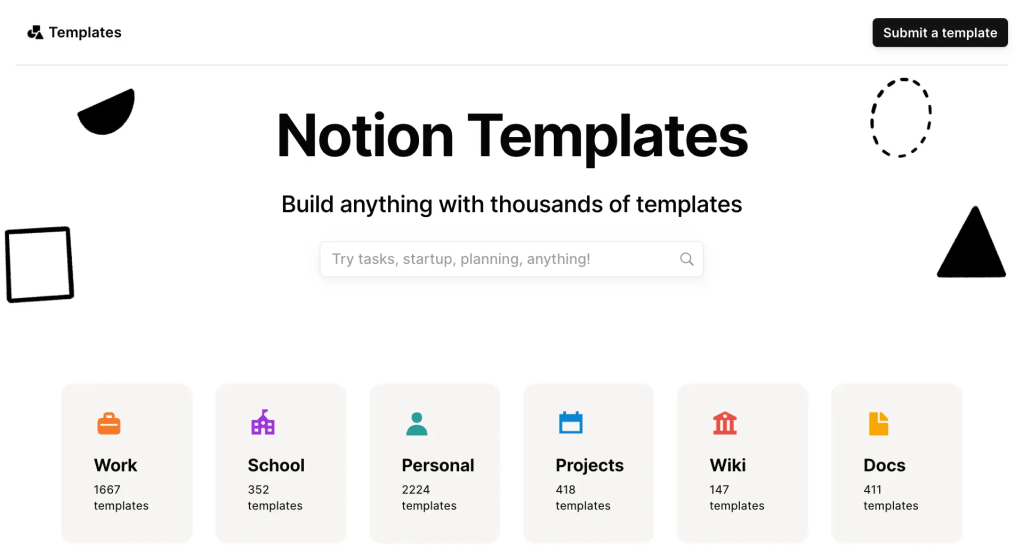
    Research continued to influence my final decisions. Exploring Notion’s template library helped me understand how dashboards and connected databases can organize information without requiring users to jump between unrelated files. Resources from the Interaction Design Foundation also influenced how I approached UX processes and portfolio preparation. Looking at products such as the UX Portfolio Playbook throughout development also helped me think about how career focused UX resources can provide structure rather than simply information.

    Looking back, one of my biggest lessons from creating the UX Launch Kit is that product development is much more iterative than I expected. My original idea was broader and included many different resources for beginning a UX career. As I built the product, I learned that adding more features wasn’t necessarily making it more useful. What mattered more was creating a clear experience.
    The final UX Launch Kit is designed for students, career changers, and beginner UX/UI designers who need help organizing their work and turning UX projects into portfolio ready case studies. Its value isn’t that it gives users more information to sort through. Instead, it brings the process together and gives them a clearer idea of what to do next.

    Finishing this project also changed how I think about product design. A finished product isn’t simply a collection of finished components. Those components need to work together to create an experience. For me, connecting everything in Notion was the step that finally made the UX Launch Kit feel less like an assignment and more like a product.
  • By Nicholas Pagonis

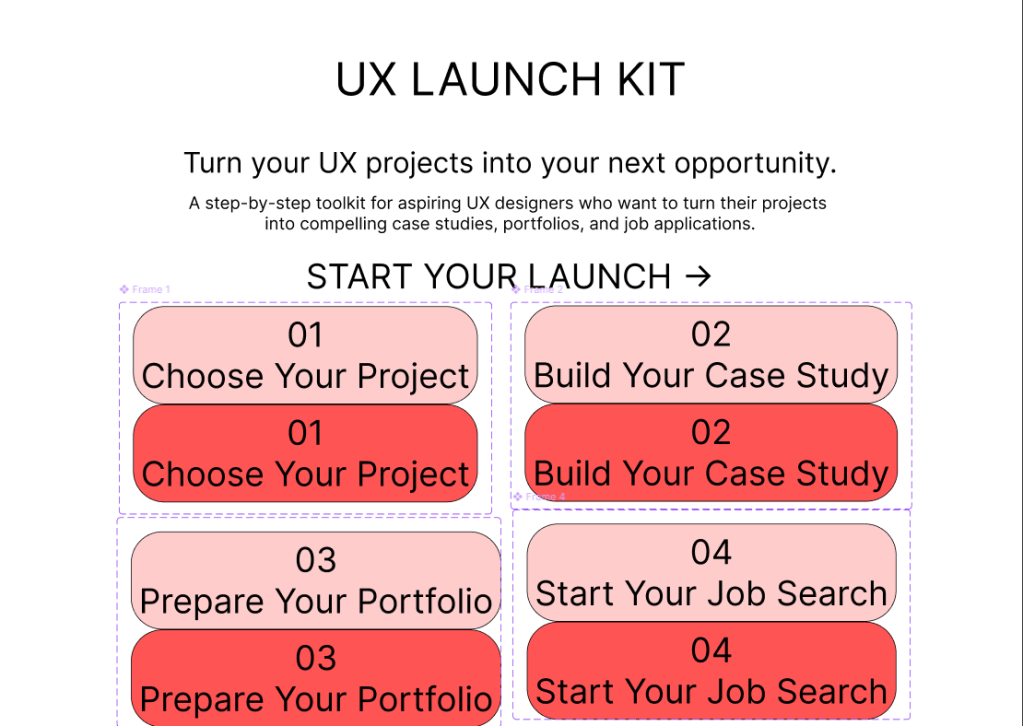
    The potential homepage of the UX Launch Kit, with buttons that grow a darker shade of red when clicked on.

    The beginning of a digital product is exciting. You have ideas everywhere, possibilities seem endless, and there is no shortage of things you could create. The end is exciting too, because you can finally see the finished product. Week two of developing my UX Launch Kit reminded me that the middle is where things get much more complicated.

    This week, I moved further away from planning and more into actually building the product. Instead of thinking about the UX Launch Kit as one large idea, I started breaking it into smaller pieces that could eventually work together. I focused on the core resources, including the case study framework, project selection process, portfolio checklist, and job search tools.

    One of the biggest changes I made was shifting my focus from how many resources I could include to how clearly the product could guide someone through the process. My original instinct was to make the toolkit as comprehensive as possible. As development continued, I realized that more content does not automatically create more value. If a beginner opens the product and doesn’t know where to start, having more templates won’t solve the problem.

    The Build Your Case Study page, arguably the core feature of my product.

    That led to an important pivot: the UX Launch Kit needs to feel more like a guided journey than a folder full of downloads. The experience should help users move from choosing a project, to developing a case study, to preparing their portfolio, and eventually to organizing their job search.

    This also created an interesting challenge between quality and speed. Because the product has a limited development timeline, I could spend hours perfecting the appearance of one template, or I could continue building the rest of the product. I decided that getting the core structure completed was more important than making every individual piece perfect.

    That doesn’t mean quality isn’t important. It means I’m learning to distinguish between polishing something and solving a problem. A visually impressive template isn’t useful if the instructions are confusing. A simple tracker can be more valuable if it makes the user’s next step obvious.

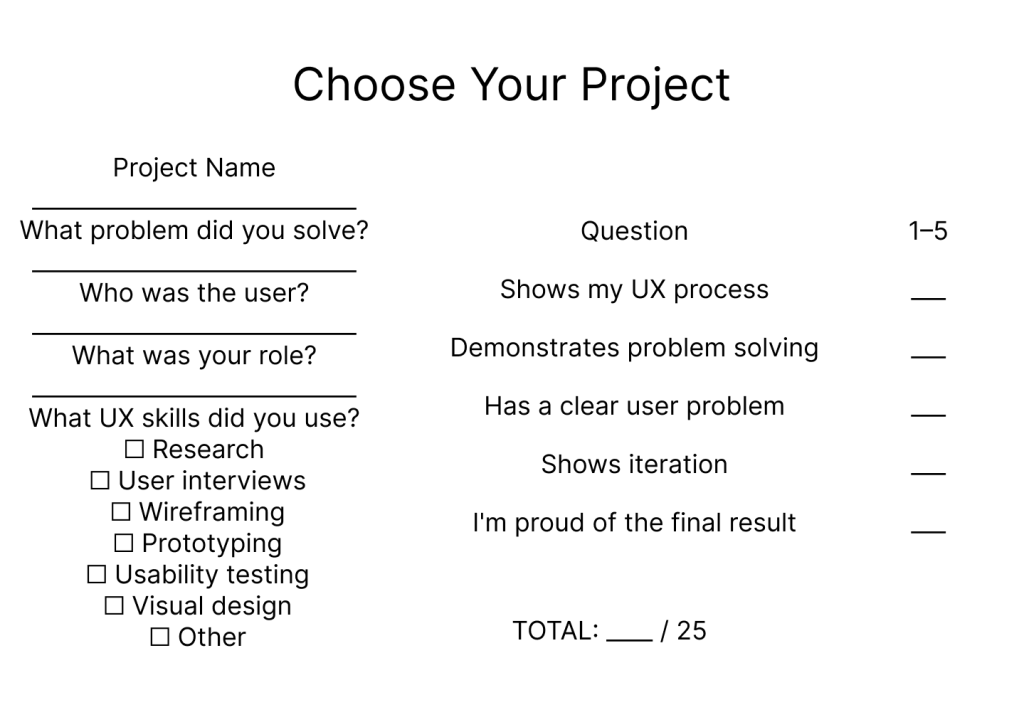
    The Choose Your Project is the first page that makes the UX Launch Kit useful.

    Researching existing UX resources also helped me work through these decisions. Exploring Notion’s template library gave me inspiration for organizing digital resources, while the Interaction Design Foundation provided useful UX and portfolio guidance. I also continued looking at the UX Portfolio Playbook to understand how more comprehensive UX career products structure their content.

    The biggest lesson from week two is that development isn’t about constantly adding. Sometimes progress means simplifying, removing, and making a decision. The middle mile can be frustrating because the final product isn’t there yet, but every revision brings the concept closer to something that could actually help someone.

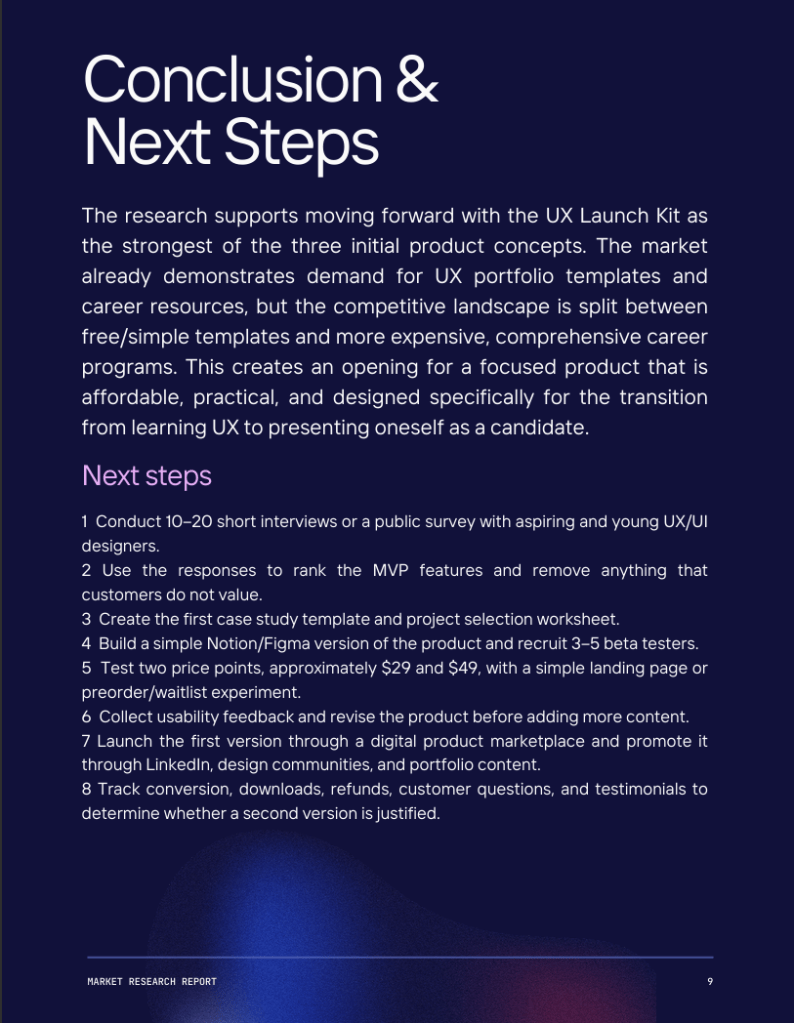
    For week five, my goal is to finish connecting the core pieces, test the experience from a beginner’s perspective, and identify what needs to change before moving toward a more polished version.

  • By Nicholas Pagonis

    There is a big difference between having an idea for a digital product and actually starting to build it. During the first week of developing my UX Launch Kit, I learned that the hardest part isn’t necessarily coming up with features. It’s deciding which features actually belong in the first version.

    My original concept was fairly broad. I wanted to create a resource that could help aspiring UX designers with their portfolios, resumes, LinkedIn profiles, job applications, and interviews. Once I started thinking about the product from a user’s perspective, however, I realized that trying to solve everything at once could make the product overwhelming.

    Starting With the MVP

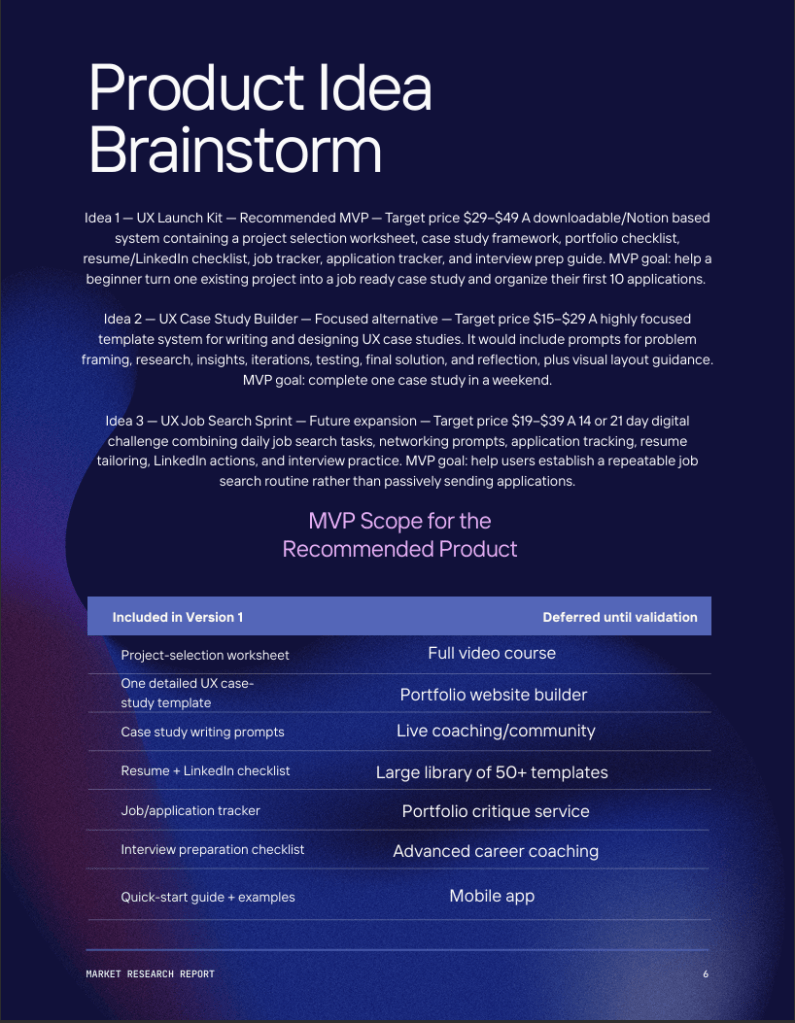
    My first development decision was to focus on the minimum viable product, or MVP. Instead of attempting to build an entire UX career program, I narrowed the initial product down to a toolkit that could help someone move from an existing project to a professional case study and an organized job search.

    I started organizing the product into sections such as project selection, case study development, portfolio preparation, and job searching. This helped me visualize the experience as a process rather than simply a collection of downloadable resources.

    Tools and Resources

    For this stage, I used tools such as Notion, Canva, and Figma to organize ideas and begin developing the product’s structure and visual direction.

    I also continued researching existing UX resources. Looking at Notion’s UX portfolio templates helped me understand how existing products organize information, while the Interaction Design Foundation’s UX portfolio resources provided additional examples of how designers approach portfolio development. Resources such as the UX Portfolio Playbook also helped me see how a more comprehensive paid product could be structured.

    What Surprised Me

    My biggest assumption going into the week was that building the product would mostly involve creating the individual templates and worksheets. In reality, the structure and user experience come first.

    I found myself asking questions I hadn’t considered during the brainstorming stage: What should users do first? How much information is too much? Which features are essential? What should be saved for a future version?

    Those questions changed my approach. Rather than trying to make the product as large as possible, I’m beginning to see that a successful MVP should be focused and easy to understand.

    What’s Next

    At the end of Week 1, the UX Launch Kit is still a work in progress, but the idea is becoming much more concrete. My next step is to continue developing the actual toolkit, create early versions of the core resources, and eventually put them in front of potential users for feedback.

    The biggest lesson from this first week is simple: building a digital product is an iterative process. The idea I started with isn’t necessarily the product I’ll finish with, and that’s actually a good thing.

  • By Nicholas Pagonis

    Creating a digital product starts with an idea, but turning that idea into something people would actually use requires research, experimentation, and a willingness to change direction. When I began developing my product concept, I knew I wanted to create something connected to my interest in UX/UI design. My initial goal was to develop a digital resource that could be useful to people who were learning design or trying to enter the industry. I quickly realized, however, that “something for UX designers” was too broad.

    My first step was exploring several possible directions. I considered a UX case study builder, a UX job search resource, and a more comprehensive career toolkit. I researched existing products on marketplaces such as Notion and looked at resources from organizations such as the Interaction Design Foundation. I also examined products such as the UX Portfolio Playbook to understand what competitors were offering, how they positioned their products, and what customers were willing to pay.

    The research changed the way I thought about my original idea. I found that there are already many free and inexpensive UX portfolio templates available. For example, UX portfolio templates on Notion have received significant numbers of public ratings, suggesting that designers are actively looking for tools that make organizing and presenting their work easier. At the other end of the market, products such as UX Playbook offer much more comprehensive career systems at premium prices. This helped me identify an opportunity between the two: a product that provides more guidance than a basic template without becoming an expensive course or coaching program.

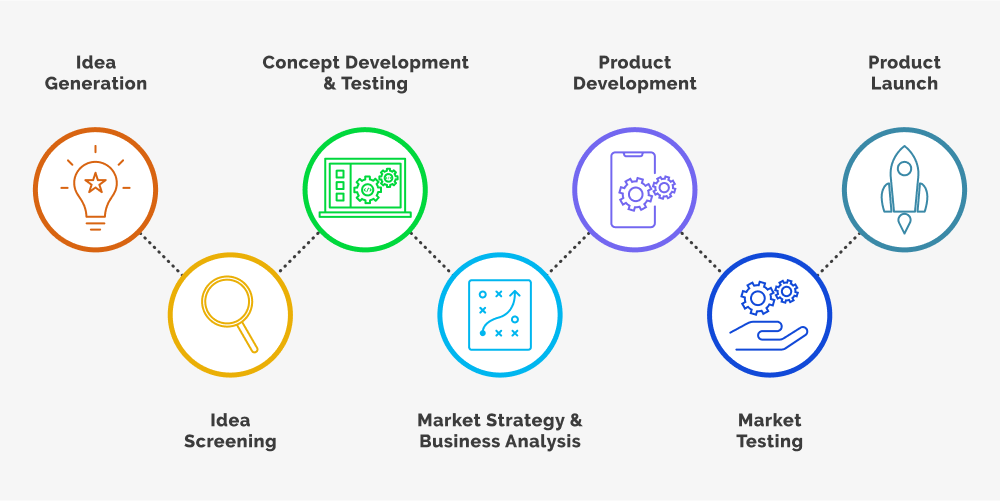
    That led me to my current concept: the UX Launch Kit. The product is designed for aspiring UX/UI designers, particularly students, recent graduates, and career changers who have projects to show but may not know how to turn those projects into a professional portfolio and job search strategy. The proposed toolkit would include a case study framework, project selection worksheet, portfolio checklist, resume and LinkedIn guidance, job application tracker, and interview preparation resources.

    Feedback and market research also influenced my decision to keep the first version focused. Instead of trying to create a massive career course, I decided that the minimum viable product should solve a specific problem: helping a beginner take an existing project and turn it into a strong case study while creating an organized application process. This makes the product more realistic to build and easier to test with potential users.

    The biggest lesson from this process is that product development is not simply about creating something I think is useful. It is about finding the intersection between what I enjoy creating, what I know, and what people actually need. My next step is to conduct primary research with aspiring and early career UX designers, test the proposed features and price range, and use that feedback to refine the UX Launch Kit before developing the final product.

  • By Nicholas Pagonis

    A good product idea starts with a good question. Instead of asking, “What can I create?” I approached this project by asking, “What problem is worth solving, who experiences it, and what are existing products failing to address?” My market research focused on three areas: current consumer and technology trends, competitor analysis, and the needs of students and early career creatives entering an increasingly skills based job market.

    The research revealed an important opportunity. People have more tools than ever to learn, design, and publish their work, but there is still a significant gap between creating work and knowing how to present that work professionally.

    Three Potential Product Opportunities

    1. Personalized UX/UI Learning Platform

    My first concept was a digital learning platform for aspiring UX/UI designers. The platform would combine interactive lessons, design challenges, feedback, and portfolio projects.

    There is clearly an established market for online learning. Coursera’s 2026 financial results reported that the company reached 205 million registered learners in Q1 2026, after adding a record 7.6 million learners during the quarter. LinkedIn Learning also offers more than 24,000 expert led courses, demonstrating the scale of competition in professional online education.

    The challenge is differentiation. A new learning platform would be competing against companies with enormous libraries, established brands, and extensive resources. Simply offering another collection of UX/UI courses would not provide enough competitive advantage.

    2. AI-Assisted Content and Design Planning Tool

    The second concept was an AI powered tool for designers and content creators. It could help users organize ideas, develop creative briefs, build content calendars, and plan projects.

    The market is extremely competitive. Canva’s 2025 review reports that Canva reached 260 million monthly users and $3.5 billion in revenue in 2025. In 2026, Canva has continued expanding its AI capabilities, including Canva AI 2.0 and AI powered workflows.

    Adobe presents another major competitor. In Q2 FY2026, Adobe reported $6.62 billion in quarterly revenue, while Creative & Marketing Professionals subscription revenue reached $4.54 billion. Adobe also reported that its creative freemium monthly active users surpassed 90 million, up more than 70% year over year.

    These numbers demonstrate the size of the creative technology market, but they also demonstrate why competing directly with established AI and design platforms would be difficult.

    3. Guided Portfolio Development Platform

    The third concept is a platform designed specifically for students, recent graduates, and early career creatives who need to turn their projects into professional portfolios.

    This concept became the most compelling after looking at the employment market. LinkedIn’s 2026 research found that entry level hiring was down 6% year over year, while 44% of Gen Z respondents identified not having the right network as their biggest barrier to landing an entry level position. At the same time, 22% said they were building apps, websites, or other projects to demonstrate their skills.

    That last statistic is particularly important. It suggests that young professionals increasingly understand that they need to show what they can do, not simply describe what they have studied.

    The trend toward skills based hiring strengthens the opportunity. The National Association of Colleges and Employers’ 2026 research indicates that nearly 70% of employers use skills based hiring practices. NACE specifically recommends that students translate coursework and extracurricular experiences into skills language and demonstrate those skills through resumes, portfolios, and other career materials.

    There is also evidence that creative portfolios can play an important role in career development. Adobe’s research found that 93% of early career professionals who used Adobe tools discussed those skills in job interviews, while 81% of current students said they intended to do so. Adobe also reported that Creative Campus graduates reached full time employment up to 15% sooner.

    Competitive Landscape

    The competitive landscape is significant, but it also reveals a potential gap.

    Behance has more than 50 million members, making it one of the world’s largest creative networks. In 2026, Behance reported more than 8 million creative portfolios and more than 10 million active creatives. It has also moved further into portfolio first hiring, with more than 100,000 freelance jobs posted annually and more than $100 million in annual freelance opportunities flowing through the platform.

    Platforms such as Behance are excellent for displaying and discovering creative work. Wix and other website builders make it possible to create a customized portfolio site. Canva and Adobe provide the tools necessary to create the actual work. Coursera and LinkedIn Learning provide education.

    However, these products primarily solve individual pieces of the problem.

    The opportunity I see is to connect those pieces.

    Identifying the Target Audience

    My primary target audience would be college students, graduate students, recent graduates, and early career creatives between approximately 18 and 30 years old who are preparing for careers in design, digital media, marketing, communications, and related fields.

    The platform would not simply help users create a website. It would guide them through a complete process:

    Select the right projects → explain the problem → document the process → demonstrate skills → tell the story → build the portfolio → prepare for employers.

    This positioning creates a potential competitive advantage: the product would focus on the story and strategy behind a portfolio, not simply the portfolio itself.

    The market research changed how I think about product development. There are already excellent tools for learning, designing, publishing, and networking. The opportunity may not be to create another tool that does one of those things. Instead, it may be to create an experience that connects them.

    For me, the strongest market opportunity is therefore a career focused portfolio development platform that helps emerging creatives turn academic and personal projects into evidence of professional ability. The next stage of this project will be determining whether users actually experience this problem strongly enough to adopt and potentially pay for a solution.

  • By Nicholas Pagonis

    Digital media is always evolving. Algorithms change, new platforms appear, and artificial intelligence is revolutionizing content production. However, I’ve discovered from my work in the DCCS program that the most crucial aspect of digital communication has stayed remarkably constant: putting people first.

    One of the most important lessons I’ve learned is that creating visually pleasing material is not enough to create interesting digital content. Understanding the audience, recognizing a problem, and developing an experience that makes information accessible and relevant are the first steps in effective communication. I’ve learnt to ask the straightforward question, “What does the audience need from this?” whether I’m creating a website, brainstorming a social media image, or considering a UX/UI project.

    Additionally, the DCCS program has pushed me to go beyond specific content pieces and take into account the overall strategy that underlies them. A website, blog, social media post, logo, or interactive experience shouldn’t stand alone. Each should convey a distinct message and contribute to a unified brand. My approach to the creative process has changed as a result of realizing that link.

    Learning to use technology, especially AI, as a tool rather than a substitute for creativity has been another crucial lesson. AI can speed up research, streamline processes, and organize ideas, but a project’s personality and purpose come from the human viewpoint. My background in design and teaching has reaffirmed how crucial it is to comprehend the rationale behind a creative choice rather than just the instruments utilized to create it.

    I see a chance to combine creativity, strategy, and empathy as I work toward my goal of becoming a UX/UI designer. My goal is to develop visually captivating digital experiences that are also accessible, intuitive, and purposeful.

    In the end, I’ve discovered that producing more digital material is not the key to success. The goal is to improve the experiences of those who engage with our creations. That’s the viewpoint I want to apply to my future work and the difference I want to make in the rapidly changing digital media landscape.

  • By Nicholas Pagonis

    Anyone seeking to pursue a successful career in UX/UI design must keep up with the latest trends in the rapidly evolving sector. The best design trends are those that enhance usability, accessibility, and the user experience overall, even though visual styles evolve over time. As a prospective UX/UI designer, I think it’s crucial to comprehend these trends as well as the tools that are utilized to produce them.

    Accessible and inclusive design is currently one of the most popular concepts. Instead of just making goods that seem attractive, designers are making sure that people with a variety of skills can use digital experiences. Instead of being optional extras, features like enough color contrast, keyboard navigation, intelligible typography, and screen reader compatibility are now considered standard. The Web Content Accessibility Guidelines (WCAG), published by the World Wide Web Consortium (W3C), are a valuable tool for designers creating accessible products.

    AI-assisted design is another emerging trend. The way designers come up with concepts, produce wireframes, and produce content is evolving due to artificial intelligence. AI solutions enable experts to spend more time creatively solving user problems and less time on monotonous chores, rather than taking the place of designers. Future UX/UI designers will find it more and more important to learn how to work with AI tools.

    Additionally, design systems are becoming more prevalent in businesses. Design systems are used by businesses to improve cooperation between designers and developers and establish uniformity across products. Excellent examples of how reusable parts and unambiguous design guidelines improve user experiences while increasing development efficiency are Google’s Material Design and IBM’s Carbon Design System.

    Interface design is still influenced by minimalism, although contemporary minimalism emphasizes clarity over merely minimizing visual components. Users may accomplish activities with less effort thanks to clear layouts, deliberate typography, well-considered whitespace, and simple navigation. Designers are focusing on utility and lowering cognitive strain rather than embellishing an interface.

    I want to concentrate on creating experiences that strike a mix between creativity and usability as I continue to develop my UX/UI portfolio. I can better grasp what consumers demand today and where digital experiences are going in the future by keeping up with industry trends. My objective is to design aesthetically appealing, user-friendly interfaces that are accessible to anyone.

  • By Nicholas Pagonis

    What Were the Arab Spring Middle East Uprisings?

    Social media has completely transformed the way that public speech, protest, and power interact in the modern world. A smartphone may now naturally produce what formerly required centralized leadership, physical presence, and access to traditional media. The Arab Spring, a wave of upheavals that showed both the potential and the limitations of digitally powered movements, is one of the moments that most exemplifies this change.

    Social media sites like Facebook, YouTube, and Twitter were used to plan protests, disseminate updates in real time, and expose governmental atrocities to a worldwide audience during the Arab Spring. Social media helped mobilize sizable portions of the populace in nations like Egypt and Tunisia, especially young people who were fed up with repression, unemployment, and corruption. Governments found it more difficult to manage narratives as a result of the disruption of conventional power structures caused by the speed and volume of information flow.

    However, social media did not ensure the success of these movements, even though it did help spark them. While some governments collapsed, others adjusted, regained power, or became unstable. This brings up an important point: social media can magnify opposition, but it cannot create long-lasting political structures on its own. It is a catalyst for long term institutional change rather than a replacement for it.

    The Black Lives Matter protests preview the politics of a diversifying  America | CNN Politics

    Researchers have observed similar dynamics in other movements. For example, hashtags, viral videos, and internet organizing helped the Black Lives Matter campaign acquire global traction. Once unnoticed instances of police violence turned into international hotspots that sparked demonstrations and policy debates. In addition to raising awareness, social media influenced public opinion and put pressure on organizations to take action.

    Similarly, by enabling people to publicly share their personal experiences, movements like #MeToo exposed systematic abuse. These narratives, which conventional systems frequently disregarded, acquired credibility and collective weight on the internet. Social media made it possible for underrepresented voices to demand responsibility and reach past gatekeepers.

    Can social media, thus, “right wrongs” or overthrow repressive regimes? “Sometimes, but not by yourself,” is the response. Social media may link like minded people, reduce participation barriers, and bring injustice to the attention of the world. Authoritarian regimes may weaken the informational control they rely on. Real change, however, usually necessitates collaboration outside of the digital realm, including political organization, economic pressure, legislative reform, and ongoing civic participation.

    There are actual dangers as well. Governments can utilize the same channels that empower activists for disinformation, propaganda, and monitoring. Misinformation can break up movements or reduce them to performative “clicktivism,” where participation on the internet doesn’t result in significant action. Algorithms have the potential to skew public perception by favoring sensational news over factual or nuanced information.

    The #MeToo Movement and its Impact on Employment Law — The WS Society

    We can discover that social media works best when it supports local initiatives rather than taking their place. Successful movements often demonstrate digital visibility, well defined objectives, leadership frameworks, and long term change tactics. They also adjust to the platforms they use, staying aware of their limitations and reach.

    Social media will probably continue to play a major role in international movements in the future. It is unparalleled in its capacity to immediately connect millions of individuals. However, the way we apply it determines its actual impact. It may be a potent force for justice if activists, organizations, and regular users approach it carefully, striking a balance between speed and accuracy and visibility and strategy.

    Ultimately, social media does not produce justice by itself, individuals do. However, it can provide those individuals with a greater voice, a larger audience, and occasionally the momentum required to transform indignation into actual change.

  • By Nicholas Pagonis

    What is app stickiness? | AppsFlyer mobile glossary

    The most valuable currency in the crowded, fast-paced world of social media is attention. Every scroll, like, and share reveals a momentary choice about what merits someone’s attention. In this context, “stickiness” has become a key component of successful material. The term “stickiness” describes how well a piece of material draws in and retains viewers—that is, how memorable, captivating, and shareable it becomes. Stickiness has a major impact on advancing social welfare and creating a better future, despite being frequently linked to marketing and entertainment.

    Sticky content is fundamentally appealing. It conveys information in a way that feels urgent and intimate, arouses emotion, or tells a gripping tale. Consider visually arresting infographics that make facts accessible or short films that condense complicated societal topics into easily understood tales. People are more likely to interact with and share content when they feel something, be it empathy, outrage, inspiration, or hope. Passive viewers become active participants because of this emotional and cognitive involvement.

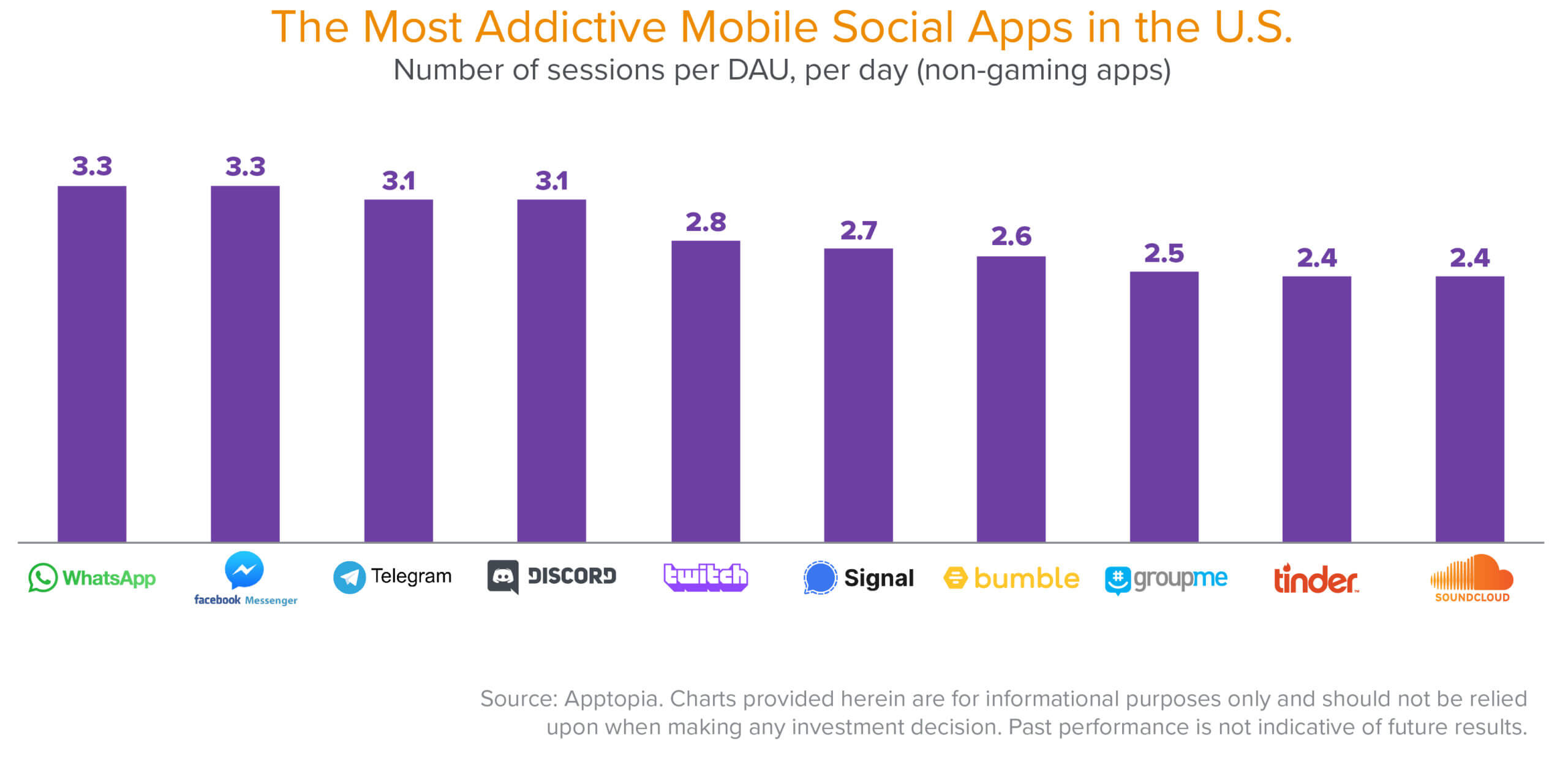
    The Stickiest, Most Addictive, Most Engaging, and Fastest-Growing Social  Apps—and How to Measure Them | Andreessen Horowitz

    Stickiness can significantly amplify social issues. Campaigns that effectively use it can increase awareness in ways that go well beyond conventional outreach techniques. For instance, a well-written post about climate change might have strong imagery, a succinct message, and an obvious call to action, urging readers to comprehend the problem and spread it among their networks. In this sense, stickiness facilitates the spread of ideas through peer-to-peer communication, frequently at an exponential rate. People become amplifiers as a result.

    Additionally, stickiness can make difficult or neglected problems easier to understand. Because social problems entail complex systems, historical context, and abstract data, they are frequently challenging to understand. Sticky material converts complexity into clarity by simplifying without requiring oversimplification. Audiences are more inclined to care when they can instantly grasp why something is important. This is especially crucial for capturing the attention of younger audiences, who are quick information consumers and demand visually appealing and educational content.

    But the same characteristics that make information memorable also bring about serious restrictions and moral dilemmas. The danger of oversimplification is one of the main problems. Content producers may remove subtleties to make their work easier to read and distribute, which could result in misconceptions or unfinished stories. It’s not always possible to condense complicated topics like global health problems or systematic inequalities into a single post without sacrificing important context. Stickiness can distort reality instead of illuminating it when it puts virality ahead of accuracy.

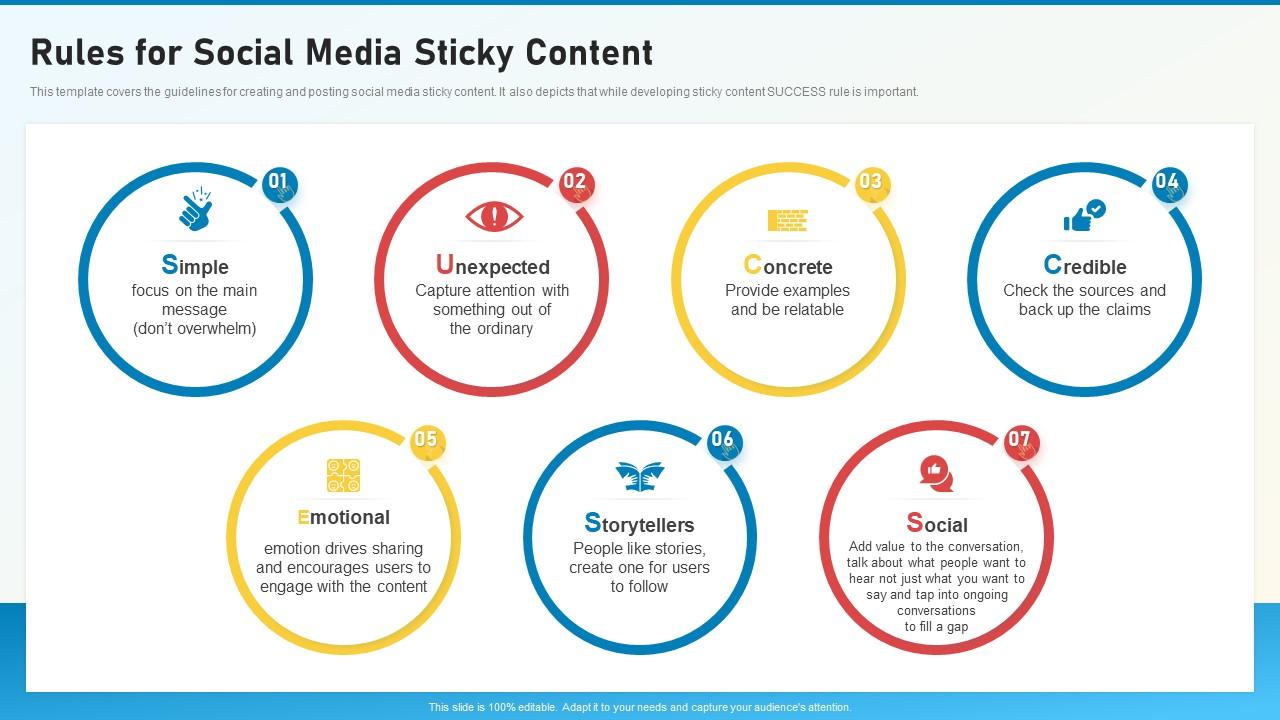
    Social Media Playbook Rules For Social Media Sticky Content | Presentation  Graphics | PowerPoint PPT Presentation Example | Slide Templates

    The possibility of manipulation is another issue. Sticky material frequently uses emotional triggers, which can be used to propagate divisive or false information in addition to motivating positive action. Regardless of its truthfulness, very sticky content may receive excessive attention since algorithms typically favor interaction more than truth. This fosters an atmosphere in which destructive or deceptive narratives can proliferate just as readily as positive ones.

    Additionally, “slacktivism” replaces real activity with engagement with sticky information. Without necessitating more in-depth engagement, liking, sharing, or commenting on a post can encourage participation. Even if these activities raise awareness, they might not result in actual change if they are not combined with consistent work, such as volunteering, making donations, or supporting legislative changes. In this way, stickiness can create the impression of having an impact.

    Stickiness is nevertheless a useful tool when applied carefully, despite these difficulties. The key is to achieve a balance between integrity and involvement. By employing narrative strategies that pique interest rather than stifle debate, content producers and activists can work to make their views compelling without compromising veracity. You can close the gap between awareness and impact by offering links to further resources, fostering critical thinking, and encouraging concrete actions.

    In the end, stickiness is a mechanism rather than anything intrinsically good or harmful. The way it is used determines its worth. Sticky material may inspire collective development, mobilize communities, and amplify marginalized voices when it is in line with ethical aims, genuine facts, and meaningful calls to action. Understanding stickiness may be one of the best ways to put awareness into practice and move society, even in tiny steps, toward a better future in a digital world characterized by a never-ending fight for attention.

    The Algorithms Behind Social Media's Stickiness - Martechvibe | Where  Technology Powers MarketingMartechvibe | Where Technology Powers Marketing
  • By Nicholas Pagonis

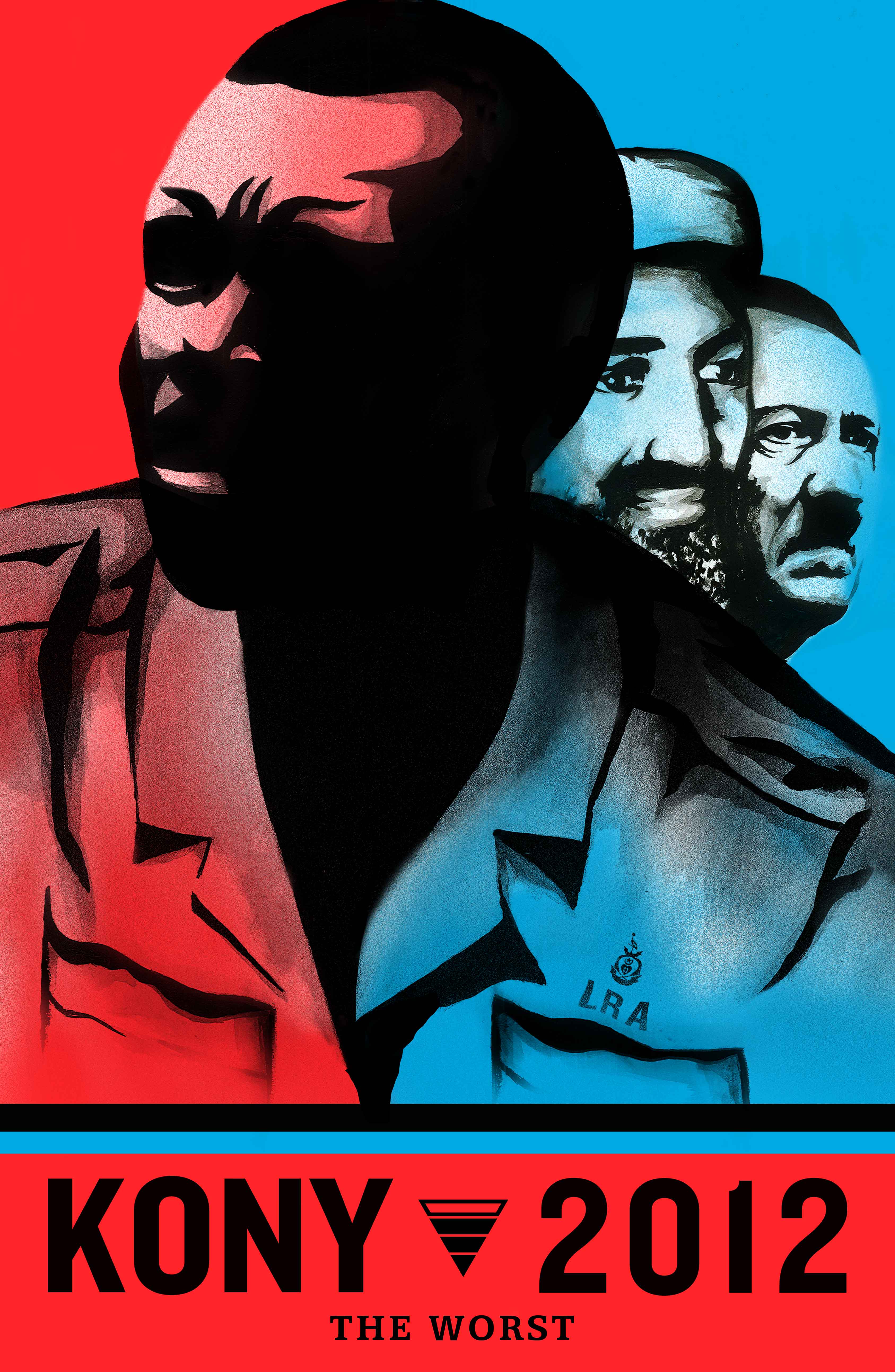
    Kony 2012 (Short 2012) - IMDb

    In retrospect, the Kony 2012 campaign seems like a snapshot of the early power of social media—raw, emotive, and a little unrefined. Whether you viewed it when it first went viral or are watching it years later, the experience usually has the same effect: it draws you in quickly, evokes strong emotions, and leaves you feeling like you need to take action.

    The most striking thing about the 30-minute video when I initially watched it was how intimate it seemed. It didn’t sound like a conventional news story or documentary. Rather, it was as though someone was talking directly to me, making a complex problem understandable and important. The emotional core, focused on children, injustice, and the idea that awareness could lead to action, was hard to ignore. Sharing the video felt almost like a duty because of the moral clarity it produced.

    However, the response changes when you watch it again years later. The emotional tug is still present, but it’s easier to see how meticulously crafted that reaction is. The story simplifies the actual issue, barely depicting its intricacy and making it nearly too tidy. That alters the campaign’s perception, but it doesn’t necessarily render it useless. There is a layer of skepticism, in addition to feeling moved. You start to ponder what is missing, whose voices remain unheard, and whether mere awareness can truly lead to meaningful transformation.

    Perhaps the most significant lesson the Kony 2012 campaign imparts to us about social media is this contradiction between emotional impact and analytical inquiry. It demonstrates the potency of storytelling in a digital setting. When combined with the capacity to instantaneously communicate with a worldwide audience, a skillfully written story can raise awareness of topics that might otherwise go unnoticed. The campaign was a complete success in that regard. Millions of individuals who had never heard of the issue suddenly felt a connection to it, cared about it, and talked about it.

    Kony 2012,' 10 Years Later - The New York Times

    However, it also highlights the boundaries of that type of interaction. Social media makes it simple to believe that blogging about a problem or sharing a video equates to taking action. The distinction between impact and awareness becomes hazy. Although Kony 2012 attracted a sizable audience, the long-term outcomes fell short of its prominence. That disparity is difficult to overlook and implies that virality is insufficient on its own.

    If there is a lesson to be learned about utilizing social media to advance altruism and build a better future, it is that both execution and intention are important. The door can be opened by emotional narrative, but it must be supported by truthfulness, openness, and unambiguous routes to significant action. People must know how to feel, what to do, and why it matters.

    We must also address the issue of accountability. Social media allows people and groups to have enormous impact, frequently with little resistance. This effect may amplify important concerns, but it can also inadvertently oversimplify or misrepresent them. The Kony 2012 campaign serves as a reminder that beneficial intentions do not always translate into positive results. We must carefully consider how we deliver stories and their potential influence.

    Ultimately, years later, Kony 2012 is still significant. Not only for what it attempted to do, but also for what it disclosed about the workings of online activism. It showed the rapidity with which people can rally around a cause, the depth of their emotional response, and the fragility of that momentum. The lesson that usually sticks in our minds when considering how to utilize social media for positive purposes is that, while attention is important, it’s just the first step.

    Kony 2012 Comes to the Mission - Mission Local